Integrations
Connect AssetJay to external tools. Right now that means Claude Desktop: tell Claude to manage your equipment and it does it.
How it works
AssetJay provides an MCP server (Model Context Protocol) that AI assistants can connect to. Once connected, you talk to Claude in natural language and it creates assets, looks up equipment, attaches receipts, and assigns devices, all through conversation.
The integration works with Claude Desktop and Claude Code. You generate an API key in AssetJay, paste a config block into Claude's settings, and you're connected.
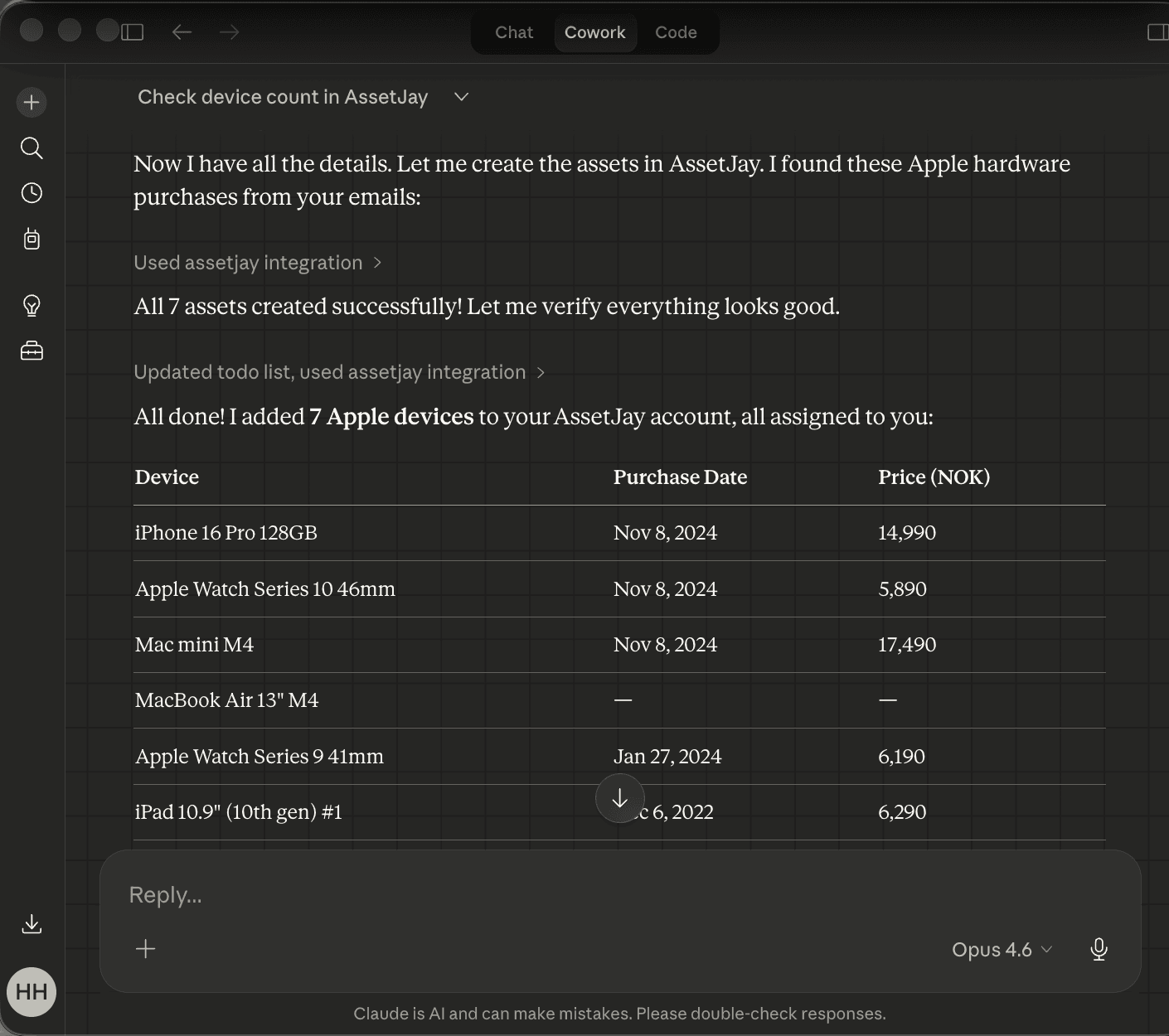
What you can do
- Scan Gmail for purchases. Ask Claude to search your email for equipment receipts and add them all to AssetJay in one go.
- Create assets by chat. "Add a MacBook Pro, serial C02X1234, assigned to Ingrid" and Claude creates the asset with all the details.
- Look up equipment. "What equipment does James have?" or "Show me all laptops" give instant answers from your inventory.
- Update existing assets. Found a serial number on a shipping email? Tell Claude and it fills in the gap on the existing asset.
- Attach receipts. Claude can attach documents directly to assets when the file is accessible.
- Add team members. "Add Meera Okafor to the team, she's in Engineering" creates the person record.
Setup guide
- Generate an API key. Go to Settings → Integrations and click "Generate API key". Give it a label (e.g. "My Claude Desktop") so you know what it's for.
- Copy the config block. After generating the key, you'll see a JSON config block. Copy it. It looks like this:
"assetjay": { "command": "npx", "args": [ "-y", "mcp-remote@latest", "https://www.assetjay.com/api/mcp", "--header", "Authorization: Bearer aj_your_key_here" ] } - Add to Claude Desktop. Open Claude Desktop → Settings → Developer → Edit Config. Paste the config block inside the
mcpServersobject. Save and restart Claude Desktop. - Start talking. Ask Claude: "What can you do with AssetJay?" It will list the available tools. Then try "List my assets" or "Scan my Gmail for equipment purchases."
Tips for best results
- Connect Gmail too. If you add the Gmail MCP connector alongside AssetJay, Claude can scan your purchase emails and create assets directly. This is the fastest way to populate your inventory.
- Be specific. "Add a MacBook Pro 16-inch M3, bought from Apple on 15 August for $2,499" gives Claude everything it needs in one sentence.
- Serial numbers from shipping emails. Purchase receipts often don't have serial numbers, but shipping confirmations do. When Claude can't download an attachment, it will add a note to the asset telling you exactly which email to check.
- Forward receipts to your inbox too. The email inbox and MCP integration work together. Claude gets you 80% of the way, then forwarding a receipt fills in the rest: serial numbers, warranty details, and the PDF proof of purchase.
Available tools
These are the tools Claude has access to when connected to AssetJay. You don't need to call them by name. Just describe what you want and Claude picks the right one.
| Tool | What it does |
|---|---|
whoami | Shows your org name, plan, asset count and limit |
list_assets | Search and filter your assets by name, asset tag, serial, category, or assignee |
list_people | List team members, used to match names when creating assets |
get_asset | Get full details for a single asset including attached documents |
create_asset | Create a new asset with any combination of fields, including its asset tag |
update_asset | Update an existing asset, filling in empty fields without overwriting |
create_person | Add a new team member |
assign_asset | Assign or reassign an asset to a person |
upload_document | Attach a file (receipt, invoice) to an asset |
Security
- API keys are hashed. We store a SHA-256 hash, not the key itself. If our database were compromised, your key couldn't be recovered.
- Scoped to your org. A key can only access your organisation's data. There's no way to access another org's assets.
- Revoke any time. Go to Settings → Integrations to revoke a key instantly. Any integration using it stops working immediately.
- No delete access. The MCP integration can create and update assets but cannot delete them. Deletion can only be done through the AssetJay UI.
- Audit trail. Every action taken through the integration is logged in your activity feed with the source marked as "API".
Common questions
Does this cost extra?
No. The integration is free on all plans, including the free tier.
Can I use this with ChatGPT?
Not yet. MCP is currently supported by Claude Desktop and Claude Code. We'll add support for other platforms as they adopt the protocol.
What happens if I hit my asset limit?
Claude will tell you that the limit has been reached and suggest upgrading. It won't silently fail.
Can Claude delete my assets?
No. The integration only supports creating, updating, and reading assets. Deleting must be done in the AssetJay UI.
Do I need to keep Claude Desktop running?
Only when you want to use the integration. AssetJay works independently. The MCP connection is on-demand, not a background sync.
Ready to connect?
Generate your API key and start managing assets by conversation.